XSaved https://xsaved.com

The bookmark manager X never built.
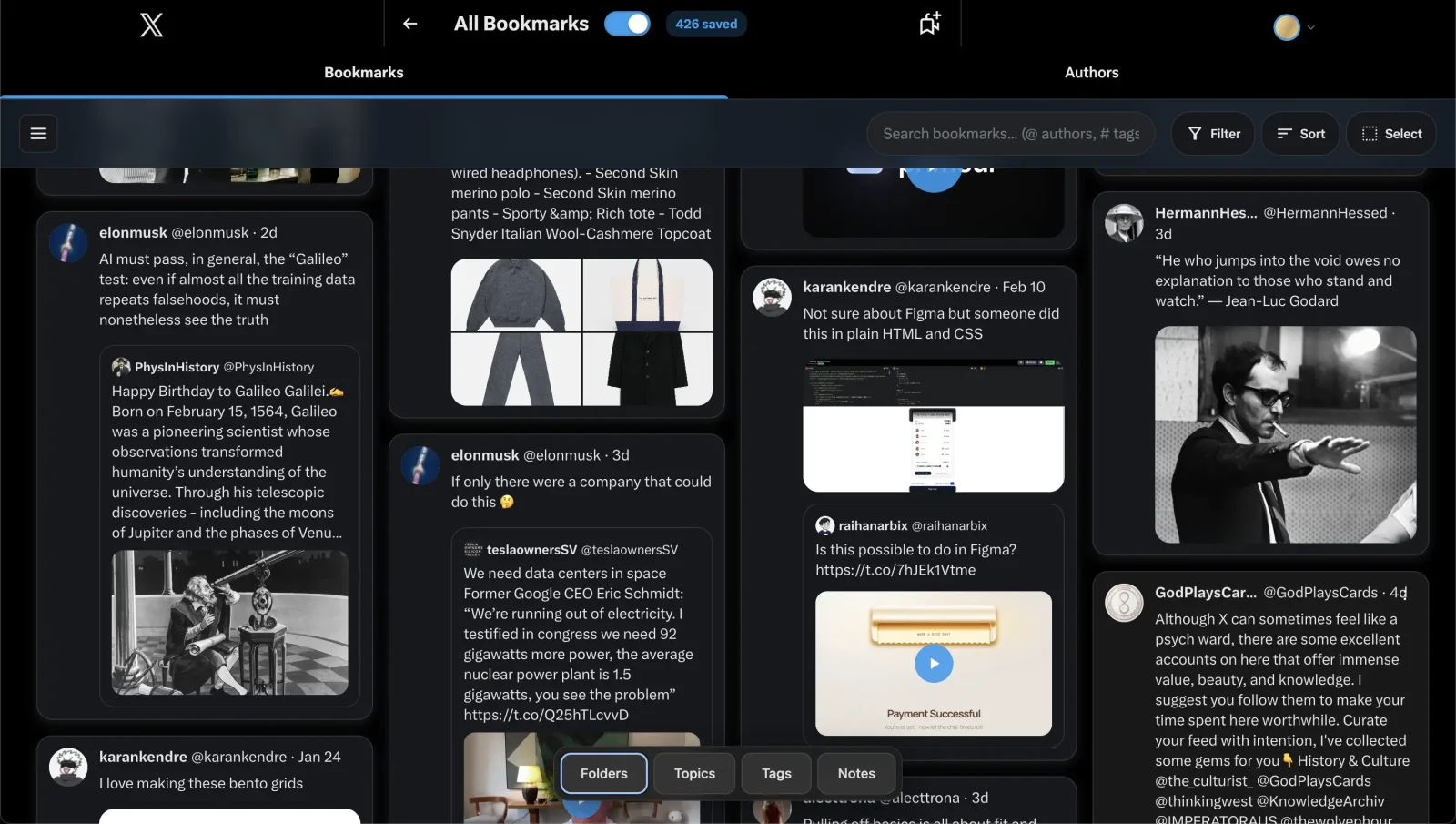
If you've ever bookmarked a post on X and never found it again, you already know the problem: X keeps your bookmarks as one endless list with no real search. XSaved is the fix — a Chrome extension that turns that list into a library you can actually use, right inside X.
I designed, built and shipped it solo. It's live on the Chrome Web Store with 400+ users, a 4.3-star rating and a growing base of paying subscribers, and it's the desktop half of a product that now continues on the iPhone.
Find anything in seconds

Type a word, an @author or a #tag and the whole library narrows as you type. Filter to photos, videos or links, sort by date, or open an author and see everything you've ever saved from them. It stays instant at two thousand bookmarks and at twenty thousand.
Organize it your way
Folders without paying for X Premium — and a post can live in more than one. Add a private note to anything worth a second look, tag freely, and select a hundred posts at once to move them in one go. Your X folders come along for the ride, in the order you left them.
Yours to keep
Everything is stored in your browser first, before anything else. Export the entire library to JSON, CSV or HTML in one click — it's never trapped inside a platform, this one included. No account is needed to use it.
One library, every device
Turn on sync and your folders, notes and tags stay in step between Chrome and the iPhone app. Sign-in is a passkey — Face ID or Touch ID, no password to remember — and the extension keeps working offline, reconciling edits when you're back. Sync is a choice, never a requirement.
How it's built
A Manifest V3 extension in React and TypeScript, injected into X itself so the library opens where your bookmarks already are. Bookmarks live in IndexedDB; the search engine is a four-pass matcher with BM25 scoring, tuned against a real library so results feel instant at any size. The optional sync backend uses passkey (WebAuthn) authentication and settles bulk edits with last-write-wins, so reorganizing a lot at once stays fast and predictable. X keeps moving its bookmarks around — most recently into a new History page — and the extension has tracked every change, with a public changelog running from v0.45 to v0.98 this year alone.
The same library also powers the lab work: xsaved-rag, a hybrid keyword-and-vector search kept honest by an eval harness, and xsaved-mcp, which exposes your bookmarks as tools for Claude and other agents.
Also on iPhone
XSaved for iPhone imports your bookmarks straight from X on the phone — no desktop or extension required — and shares this same sync layer. It's launching soon on the App Store.
More about XSaved for iPhone → · there's also an earlier native Mac companion.
Get it
Free on the Chrome Web Store. Install it, open your bookmarks on X, and the library fills in on its own. Everything else lives at xsaved.com.